
Comparison of BASIC Keywords Between ZX Spectrum and the Commodore 64
Overview
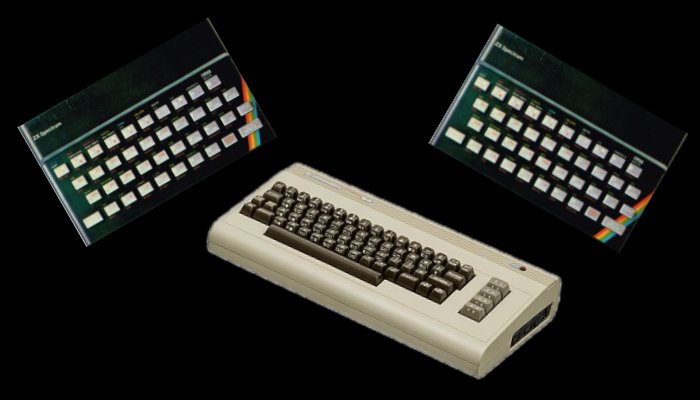
The following is a list of keywords, operators and delimiters used on the Commodore 64 computer and the ZX Spectrum.
The Commodore 64 was released in 1982, the same year as the ZX Spectrum, and outside of the United Kingdom, was the world's best selling home computer. With dedicated graphics and sound processors, the Commodore 64 boasted hi-resolution graphics and superior sound to the ZX Spectrum. But these were difficult use as the BASIC available on the '64 (Commodore 64 BASIC V2) did not have any predefined keywords to control the in-built sound and graphics.
To control sound and graphics on the '64 POKE must be used to pass the necessary data to the appropriate registers or memory locations, as opposed to the ZX Spectrum, which had a large range of keywords for controlling sound and graphics (mostly graphics), including BEEP, PLAY (on 128K machines), PLOT, DRAW, and CIRCLE, as well as the many other statements for altering the colour attributes and over-printing.
The Commodore 64 also lacked statements to retrieve the value of a screen location, whether that be a pixel conditon (POINT), colour attribute (ATTR), or character on screen (SCREEN$), for these only PEEK could be used.
Below, the list of keywords is meant for those who wish to covert Commodore 64 programs to run on a ZX Spectrum and is limited by the fact that this is only a list of keywords and not a complete guide to the conversion process. Converting from Commodore to Spectrum may prove difficult and in the future I intend to give a more detailed guide of how to convert programs between these to machines.
But for now...here is the list.
The Commodore 64 was released in 1982, the same year as the ZX Spectrum, and outside of the United Kingdom, was the world's best selling home computer. With dedicated graphics and sound processors, the Commodore 64 boasted hi-resolution graphics and superior sound to the ZX Spectrum. But these were difficult use as the BASIC available on the '64 (Commodore 64 BASIC V2) did not have any predefined keywords to control the in-built sound and graphics.
To control sound and graphics on the '64 POKE must be used to pass the necessary data to the appropriate registers or memory locations, as opposed to the ZX Spectrum, which had a large range of keywords for controlling sound and graphics (mostly graphics), including BEEP, PLAY (on 128K machines), PLOT, DRAW, and CIRCLE, as well as the many other statements for altering the colour attributes and over-printing.
The Commodore 64 also lacked statements to retrieve the value of a screen location, whether that be a pixel conditon (POINT), colour attribute (ATTR), or character on screen (SCREEN$), for these only PEEK could be used.
Below, the list of keywords is meant for those who wish to covert Commodore 64 programs to run on a ZX Spectrum and is limited by the fact that this is only a list of keywords and not a complete guide to the conversion process. Converting from Commodore to Spectrum may prove difficult and in the future I intend to give a more detailed guide of how to convert programs between these to machines.
But for now...here is the list.
Commands
Keyword
Meaning
Comments
CLEAR (Command)
CLEAR n (ZX Spectrum)Result (ZX Spectrum): Clears the screen, deletes all variables, resets PLOT and PRINT positions, clears the GOSUB stack and lowers RAMTOP to n.

CONT or CONTINUE
CONT (Commodore 64)CONTINUE (ZX Spectrum)Result: After END or STOP statements are encountered. (Commodore 64)
or
After STOP is encountered or BREAK* is pressed (ZX Spectrum)
CONT or CONTINUE will execute the next line after the error occurred.
*The report
L (BREAK into program) occurs on the ZX Spectrum when BREAK is pressed whilst a program is running.
LIST
LIST (Commodore 64 and ZX Spectrum)Result: Display complete program listing.
LIST n (ZX Spectrum)Result: Display program listing from line n or line 0 where no line number specified.
LIST n (Commodore 64)Result: Display single program line n.
LIST [m]-[n] (Commodore 64)Result: Display program listing from line m to line n. If m is omitted listing will begin at the start of the program. If n is omitted then listing will stop at the end of the program. If both m and n are omitted, i.e.
LIST - ,the complete program will be listed (same as LIST).LLIST
LLIST (ZX Spectrum)Result: Send a complete program listing to the printer.
LLIST n (ZX Spectrum)Result: Print the program listing from line n or line 0 where no line number specified.
LOAD
LOAD "" (ZX Spectrum)LOAD (Commodore 64)Result: Load the first program encountered on cassette. On the ZX Spectrum double quotes may be replaced by a string variable as long as it is a null string.
LOAD f (Commodore 64 and ZX Spectrum)Result: Load program f.
LOAD f DATA () (ZX Spectrum only)Result: Load array f from cassette into the variables area of memory.
LOAD f CODE [m[,n]] (ZX Spectrum)Result: Load data from cassette into the memory location specified when the file was saved. If m is specified then load into memory location m. Optionally n (number of bytes to load) may also be specified)
LOAD f SCREEN$ (ZX Spectrum only)Result: Load screen data from tape directly into the display file
same as:
LOAD f CODE 16384,6192LOAD "*",8 (Commodore 64)Result: Load first program from the disk drive.
LOAD f,8 (Commodore 64)Result: Load program f from the disk drive.
MERGE
MERGE fResult: Merge program f with that already in memory overwriting duplicate program lines.
See also: LOAD, SAVE, VERIFY.
NEW
NEWResult (Commodore 64): Deletes program and variables.
Result (ZX Spectrum): Deletes program and variables and memory up to and including the address held in the system variable RAMTOP.
RUN
RUN [n] (Commodore 64, & ZX Spectrum)Result (ZX Spectrum): Perform CLEAR and GO TO line n (or line 0 if n not specified).
Result (Commodore 64): GOTO line n (or line 0 in n is not specified).
RUN on the ZX Spectrum clears the screen.
On the Commodore 64, if a variable is used in place of a line number an error will occur.
SAVE
SAVE (Commodore 64)Result: Save program to tape without a filename (Commodore 64).
SAVE f [LINE m] (ZX Spectrum)Result: Save program f to tape. If LINE is specified then RUN program from line m once loaded (ZX Spectrum)
SAVE f[,1,1] (Commodore 64)Result: Save program f to tape. Optional parameters (,1,1) add an END-OF-TAPE marker to the program.(Commodore 64)..
SAVE f DATA α[$]() (ZX Spectrum)Result: Save array α to tape.
SAVE f CODE m,n (ZX Spectrum)Result: Save code from memory to tape starting at address m with a length of n bytes.
SAVE f SCREEN$ (ZX Spectrum)Result: Save display file with filename f to tape (same as SAVE f CODE 16384,6192).
SAVE f,8 (Commodore 64).Result: Save program f to disk.
VERIFY
VERIFY (Commodore 64)VERIFY "" (ZX Spectrum)Result: Verify the next program on the tape
VERIFY f (Commodore 64 and ZX Spectrum)Result: Result: Compares program f on tape with that in memory.
VERIFY f DATA α[$]() (ZX Spectrum)Result: Compare array α, with the filename f, from tape with that in memory.
VERIFY f CODE [m[,n]] (ZX Spectrum)Result: Compare code (bytes), with the filename f, on tape with that in memory.
VERIFY f SCREEN$ * (ZX Spectrum)Result: R Tape Loading Error
*This command will be accepted by the Spectrum but taped SCREEN$ code will fail verification.
VERIFY f,8 (Commodore 64)Result: Compares program f on disk with that in memory.
Statements
Keyword
Meaning
Comments
AT
(ZX Spectrum)
PRINT AT x,y; (ZX Spectrum only)Result: Changes PRINT or INPUT position to x,y.
For PRINT AT x,y on the C64 use:
POKE 211,y : POKE 214,x : SYS 58640See also PRINT.
BEEP
BEEP x,yResult: Sound emitted for x seconds at pitch y.
See also: PLAY.
BORDER
BORDER mResult: Changes screen border colour to m.
POKE 53280,mwhere m is an integer and represents the colour of the border.
BRIGHT
BRIGHT nResult: When n=1 permanent brightness is turned on. When n=0 permanent brightness is off.
keyword BRIGHT nResult: When n=1 temporary brightness is turned on. When n=0 temporary brightness is off.
keyword may be one of PRINT, LPRINT, INPUT, PLOT, DRAW or CIRCLE statements. When BRIGHT is applied to the keyword LPRINT there will be no effect on characters printed on the ZX Printer.
The Commodore 64 has a different colour pallette to the Spectrum, however some of these colours do have a lighter shade of brightness.
Below is a suggested list of colours for the Commodore 64 and those of the Spectrum with two levels of brightness.
For BRIGHT 0 most of the standard colours are the same, use light grey for white, and use purple for magenta and vice versa.
The ZX Spectrum has no 'bright black' (and neither does the Commodore 64).
For BRIGHT blue use light blue (if not using cyan)
For BRIGHT red use orange
For BRIGHT magenta use pink
For BRIGHT green use light green
The Commodore 64 does not have a BRIGHT cyan, use light blue, or an alternate colour.
The Commodore 64 does not have a BRIGHT yellow, use an alternate colour (possibly standard yellow for brown, and for BRIGHT yellow use standard yellow).
For BRIGHT white use standard white
See also: FLASH, INK, PAPER.
CLEAR (Statement)
(ZX Spectrum)
CLR
(Commodore 64)
CLEAR (ZX Spectrum)CLR (Commodore 64)Result (ZX Spectrum): Clears the screen, deletes all variables, resets PLOT and PRINT positions and clears the GOSUB stack.
Result (Commodore 64): Wipes all variables currently in use.
See also: CLEAR command.
CIRCLE
CIRCLE [c;]x,y,z (ZX Spectrum)Result: Draws a circle subject to colour items (c), of radius z at position x,y.
Although the Commodore 64 has high-resolution graphics capability, it does not have any built-in statements to plot points, draw lines, circles, or arcs. Screen memory must be directly manipulated using the POKE statement.
See also: DRAW, PLOT, POKE.
CLOSE #
CLOSE # stream_number (Commodore 64 and ZX Spectrum)Result: Close device / stream.


See also: OPEN #.
CLS
CLS (ZX Spectrum)Result: Clears the screen. Also sets the current background colour (PAPER on the Spectrum).
Instead the 64 uses:
PRINT CHR$(147)CMD
CMD n (Commodore 64)Result: Directs output to another device (n).
See also: OPEN #.
COPY
COPY (ZX Spectrum)Result: Sends the contents of the screen to the ZX Printer.
DATA
DATA e1,e2,e3, ...Result: Stores data in a list.
See also: READ, RESTORE.
DEF FN
DEF FN α([α1[,...,αk]])=e (ZX Spectrum)Result: Defines a function. α and α1 to αk can be a single letter or single letter followed by $ for a string argument.
DEF FNα(v)=e (Commodore 64)Result: Defines a function. The name of α can be 1 or 2 letters.
See also: FN.
DIM
DIM α[%¦$](n1,...,nk)[,...et cetera] (Commodore 64)DIM α[$](n1,...,nk) (ZX Spectrum)Result: Sets up an array of numbers or characters with k dimensions. For numeric arrays all values are set to zero. In the case of a string array all values are set to SPACE (CHR$ 32).
On the C64, dimensional arrays can also handle integers (%).
DRAW
(ZX Spectrum)
DRAW x,y[,z] (ZX Spectrum)Result: DRAW a high resolution line from the current PLOT position moving x horizontally and y vertically rotating through angle z if third parameter is specified.
Although the Commodore 64 has high-resolution graphics capability, it does not have any built-in statements to plot point, draw lines, circles, or arcs. Screen memory must be directly manipulated using the POKE statement.
See also: CIRCLE, PLOT, POKE.
END
END (Commodore 64)Result (Commodore 64): Terminates program and returns control to the user. CONT will continue the program.
See also: CONT, CONTINUE, STOP.
FLASH
FLASH n (ZX Spectrum only)Result: If n is set to 1 permanent flash effect is turned on. If n is set to zero then permanent flash effect is turned off.
keyword FLASH n (ZX Spectrum only)Result: If n is set to 1 temporary flash effect is turned on. If n is set to zero then temporary flash effect is turned off.
keyword may be one of PRINT, LPRINT, INPUT, PLOT, DRAW or CIRCLE statements. When FLASH is applied to the keyword LPRINT there will be no effect, obviously.
GET
GET v$ (Commodore 64)Result: Loads variable v$ with a character produced by a keypress (Commodore 64).
LET v$=INKEY$See also: INKEY$.
GOSUB or GO SUB
GOSUB n (Commodore 64)GO SUB n (ZX Spectrum)Result: Stack GO SUB line number and branch (GO TO) line n.
The ZX Spectrum manual is inconsistent with the spelling of GO SUB, using both GO SUB and GOSUB!
GOTO or GO TO
GOTO n (Commodore 64)GO TO n (ZX Spectrum)Result: Branch or GO TO line n.
INK
INK n
Result (ZX Spectrum): Sets permanent foreground colour. When n=0 to 7 a colour is selected. When n=8 transparency is selected. When n=9 contrast is selected.
keyword INK n; (ZX Spectrum only)Result: Sets temporary foreground colour. When n=0 to 7 a colour is selected. When n=8 transparency is selected. When n=9 contrast is selected.
keyword may be one of PRINT, LPRINT, INPUT, PLOT, DRAW or CIRCLE statements. When INK is applied to the keyword LPRINT there will be no effect on characters printed on the ZX Printer.
To change the 'ink' or foreground colour of text on the Commodore 64 control codes must be used.
CHR$(144) works likeINK 0 or blackCHR$(31) works likeINK 1 or blueCHR$(28) works likeINK 2 or redCHR$(156) works likeINK 3 or purple*CHR$(30) works likeINK 4 or greenCHR$(159) works likeINK 5 or cyanCHR$(158) works likeINK 6 or yellowCHR$(5) works likeINK 7 or white*or magenta on the ZX Spectrum
See also: BRIGHT, FLASH, PAPER.
INPUT
INPUT v1[,v2,v3...] (Commodore 64 and ZX Spectrum)INPUT LINE α$ (ZX Spectrum only)Result: Computer waits for input of an expression then passes the value of this to the variable v.
INPUT LINE α$ on the Spectrum strips the quotes on the input line and waits for a string to be input.
On the Commodore 64, data may be input on any area of the screen.
INVERSE
INVERSE nResult: Turns permanent inverse video effect on when n=1 or off when n=0.
keyword INVERSE nResult: Turns temporary inverse video effect on when n=1 or off when n=0.
keyword may be one of PRINT, LPRINT, INPUT, PLOT, DRAW or CIRCLE statements.
CHR$(18)To switch of inverse characters use:
CHR$(146)See also: BRIGHT, FLASH, INK, PAPER, OVER.
LET (ZX Spectrum)
[LET] (Commodore 64)
[LET] v=e (Commodore 64)LET v=e (ZX Spectrum)α$="some text"LPRINT
LPRINT ... (ZX Spectrum only)Result: Send a line of characters to the ZX Printer or printer compatible with LPRINT.
Instead the 64 uses:
OPEN 1,4CMD 1Output is now directed to the printer until the channel linked to the printer is CLOSEd.
On the Spectrum LPRINT generally works with the ZX Printer but can sometimes be used with other printer interfaces.
See also: CMD, COPY, LLIST, OPEN.
OPEN # or OPEN
OPEN m,n[,sec_addr][,filename] (Commodore 64)OPEN #m;f1[;n]¦[;n;f2] (ZX Spectrum)Result: Open a channel m for device n with secondary address (sec_addr) (optional). Cassette device requires a filename (Commodore 64)
Result: Open a stream m attached to channel f1 with device number n. Microdrives require a filename f2 (ZX Spectrum)
OUT
OUT m,nResult: Outputs byte n to port m.
OVER
OVER nResult: If n=0 then permanent overprinting is turned off. If n=1 permanent overprinting is tunred on.
keyword OVER nResult: If n=0 then temporary overprinting is turned off. If n=1 temporary overprinting is tunred on.
keyword may be one of PRINT, LPRINT, INPUT, PLOT, DRAW or CIRCLE statements. No effect when applied to LPRINT.
PAPER
PAPER n
Result (ZX Spectrum): Sets permanent background colour. When n=0 to 7 a colour is selected. When n=8 transparency is selected. When n=9 contrast is selected.
keyword PAPER n; (ZX Spectrum only)Result: Sets temporary background colour. When n=0 to 7 a colour is selected. When n=8 transparency is selected. When n=9 contrast is selected.
keyword may be one of PRINT, LPRINT, INPUT, PLOT, DRAW or CIRCLE statements. When PAPER is applied to the keyword LPRINT there will be no effect on characters printed on the ZX Printer.
The following code will do something similar:
POKE 53281,mWhere m represents the background colour.
Unlike the ZX Spectrum's PAPER statement this POKE will change the display background colour without erasing the contents of the screen. A short machine code routine could be used to simulate how the Commodore 64 changes the background colour.
See also: BRIGHT,FLASH,INK.
PAUSE
PAUSE m
Result: Stop program execution for m*1/50seconds or until a key is pressed.
PAUSE 0 is not timed but lasts until a key is pressed.
To simulate PAUSE on the Commodore 64, use:
1000 REM *** PAUSE ***1010 TI$="000000"1020 IF TI<(M*60) THEN GOTO 10201030 RETURNNotes about the above subroutine:
i) The variable M holds the number of seconds to PAUSE.
ii) The internal timer is reset every time the subroutine is called.
iii) The subroutine does not exit when a key is pressed as the ZX Spectrum does during a PAUSE.
PLAY
PLAY f1[,f2[,f3]] (All ZX Spectrum+ 128k models)Result: Play a series of musical notes according to octave, volume and tempo data stored in the string f1. All three sound channels (f1,f2,f3) may be played at once.


Sound may be produced on the 64 by means of the SID chip (Sound Interface Device). This allows the 64 to produce a wide range of sounds across 3-channels (or voices as they are called on the Commodore machine). A full comparison of Commodore SID POKEs and ZX Spectrum+ 128K PLAY macros, is currently beyond the scope of this article.
Not on the 16k/48k ZX Spectrum. Melodies may be acheived using BEEP.
See also BEEP.
PLOT
PLOT [c;]m,n (ZX Spectrum)Result: Sets pixel ink at position m,n subject to c (INK/PAPER/OVER/INVERSE) on the ZX Spectrum.
See also: CIRCLE, DRAW, POKE.
POKE
POKE m,n (Commodore 64 and ZX Spectrum)Result: Load byte n into memory address m.
(Commodore 64 and ZX Spectrum)
?
(Commodore 64 abbreviation)
PRINT ... (Commodore 64 and ZX Spectrum)? ... (Commodore 64 abbreviation)Result: Send a series of items to the display subject to control characters (and AT/TAB/INK/PAPER/INVERSE/FLASH/OVER on the ZX Spectrum).
RANDOMIZE
RANDOMIZE [n] (ZX Spectrum)Result: Sets system variable SEED to n which will be the basis for pseudo-random numbers (RND). n can be any number between 0 and 65535. When n=0 or if no number is given, then the pseudo-random number sequence is based upon the time elapsed since the Spectrum was powered on.
RND(-TI)for RANDOMIZE instead.
ZX Spectrum keyboard shows shortened RAND and not RANDOMIZE.
See also: RND.
READ
READ e1,e2,e3, ...Result: Read numeric or string information from DATA statement and pass to a variable or variables e1,e2,e3, ...
REM
REM ... (Commodore 64 and ZX Spectrum)Result: None, display comment in program listing.
RESTORE
RESTORE (Commodore 64 and ZX Spectrum)Result: Restores DATA pointer to start of program.
RESTORE n (ZX Spectrum only)Result: Restores DATA pointer to line n.
See also DATA, READ.
RETURN
RETURNResult: Take line number off GO SUB stack and GO TO the line after that line number.
STOP
STOP (Commodore 64 and ZX Spectrum)Result (Commodore 64): Stops program executions and reports line number at which program was halted. CONT will continue the program.
Result (ZX Spectrum): Stops program execution with Report 9, CONTINUE will resume program.
See also: CONT, CONTINUE, END.
SYS
SYS m (Commodore 64)Result (Commodore 64): Executes machine code subroutine at memory location m.
m is in the range 0 to 65535.
Machine code programs on the Commodore 64 and ZX Spectrum are completely incompatible as the two micros use different microprocessors.
See also: USR.
TAB
TAB(x) (Commodore 64)TAB x (ZX Spectrum)Result: Changes PRINT (Commodore 64 and ZX Spectrum), LPRINT (ZX Spectrum) or INPUT (ZX Spectrum) position to column x.
See also: PRINT.
WAIT
WAIT m,n1,n2 (Commodore 64)Result (Commodore 64): Program waits until the value held in memory location m, when XOR'd with n2, and AND'd with n1, is non-zero.
A machine code subroutine could simulate this, or even a BASIC subroutine depending on the context of the program being translated.
Compound Statements
Keyword
Meaning
Comments
FOR...NEXT loop
(FOR, TO, STEP, NEXT)
FOR α=x TO y STEP z (Commodore 64 and ZX Spectrum)[section of program to be repeated goes here]
NEXT [α] (Commodore 64)NEXT α (ZX Spectrum)Result: Sets up and executes the loop α from x to y with a step of z.
[Note] Step of +1 assumed if STEP omitted).
Although the NEXT statement is not compounded within the FOR statement as TO and STEP are, it is included here for completeness.
A variable following a NEXT statement is optional on the Commodore 64.
IF..THEN
(Commodore 64 & ZX Spectrum)
IF x THEN s (Commodore 64 & ZX Spectrum)IF x THEN line_number (Commodore 64Result (Commodore 64 and ZX Spectrum): If x is true (non-zero) then s will be executed.
Result (Commodore 64): If x is true (non-zero) then GOTO line_number.
ON...
ON...GOTO
ON...GOSUB
ON x GOTO m1[,m2...,mk] (Commodore 64)ON x GOSUB m1[,m2...,mk] (Commodore 64)Result: Branch to line m if x is true.
GO TO (m1 AND x=1)+(m2 AND x=2)+(mk AND x=k)Functions
Keyword
Meaning
Comments
ABS
ABS x (ZX Spectrum)ABS(x) (Commodore 64)Returns: Absolute magnitude of x, i.e. distance on number line from zero, -1=1 -2=2
ACS
ACS xReturns: Arccosine (inverse cosine) of x in radians.
DEF FNAC(X)=ATN(SQR(1-X*X)/X)And call with:
FNAC(X)ASC
See CODE
ASN
ASN xReturns: Arcsine (inverse sine) of x in radians.
DEF FNAS(X)=ATN(x/SQR(1-X*X))And call with:
FNAS(X)ATN
ATN x (ZX Spectrum)ATN(x) (Commodore 64)Returns: Arctangent (inverse tangent) of x in radians.
ATTR
ATTR (x,y)Returns: numeric value between 0 and 255 of the attribute at position x,y.
This short equation will simulate ATTR on the Commodore 64:
AT=55296+(RO*40)+COWhere CO is the column number, RO is the row number, and AT is the returned colour attribute.
See also POINT, SCREEN$, SCRN.
BIN
BIN bReturns: decimal value of a base2 (binary) 16 bit number.
A short subroutine can be found on page 78 of the Commodore 64 manual to convert binary to decimal.
CHR$
CHR$(x) (Commodore 64)CHR$ x (ZX Spectrum)Returns: Single character or control code, from position x in the character set.
CODE (ZX Spectrum)
ASC (Commodore 64)
CODE α$ (ZX Spectrum)ASC(α$) (Commodore 64)Returns: Numeric value (between 0 and 255) representing the position in the character set of α$. This is the inverse of the CHR$ function.
COS
COS x (ZX Spectrum)COS(x) (Commodore 64)Returns: Cosine of x in radians.
EXP
EXP x (ZX Spectrum)EXP(x) (Commodore 64)Returns: Numeric value for the function ex where e=2.7182818 (ZX Spectrum) / e=2.71827183 (Commodore 64).
FN
FNα(α1, αk) (ZX Spectrum)Result: Calls a function. α and α1 to αk can be a single letter or for the ZX Spectrum only, a single letter followed by $ for a string argument.
FNαα(m) (Commodore 64)Result: Calls a function. αα with m as the argument.
See also DEF FN.
FRE
FRE(m) (Commodore 64)Returns: An integer indicating the number of bytes in memory that are left to the user (m can be any arbitary number). FRE will return negative numbers if the number of unused bytes is over 32K.
PRINT (PEEK 23730+256*PEEK 23731)-USR 7962The Spectrum tidies string variable space as it goes.
INKEY$
(ZX Spectrum)
INKEY$ (ZX Spectrum)INKEY$ requires no operands.
Returns: Single character from a keypress.
Typical usage would be
PRINT INKEY$ (ZX Spectrum)LET A$=INKEY$ (ZX Spectrum)or
10 IF INKEY$="" THEN GO TO 10 (ZX Spectrum)See also: GET.
IN
IN mReturns: numeric value between 0 and 255 for the port m.
INT
INT x (ZX Spectrum)INT(x) (Commodore 64)Returns: x rounded down to the greatest integer (floor).
KEY$
See INKEY$
LEFT$
LEFT$(α$,m) (Commodore 64)Returns: First m characters of α$.
β$=α$( TO m)See also MID$, RIGHT$, TO.
LEN
LEN(α$) (Commodore 64)LEN α$ (ZX Spectrum)Returns: numeric value for the length of α$.
LN
(ZX Spectrum)
LOG
(Commodore 64)
LOG(x) (Commodore 64)LN x (ZX Spectrum)Returns: numeric value for the natural logarithm of x.
See also EXP, ↑, ^.
LOG
See LN
MID$
MID$(α$,m,n) (Commodore 64)Returns: n characters of α$, starting at position m. m must be greater than zero.
β$=α$(m TO m+n-1)See also LEFT$, MID$ (Statement), RIGHT$, TO.
PEEK
PEEK(m) (Commodore 64)PEEK m (ZX Spectrum)Returns: numeric value (0 to 255) stored at memory location m.
POINT
POINT (x,y) (ZX Spectrum)Returns: 1 if pixel is on or 0 if it is off, for the pixel location x,y.
POS
POS(m) (Commodore 64)Result: Returns current horizontal cursor position (0 to 39).
m may be any value and is not used by this function.
For the current row position use:
24-PEEK 23689For the current column position:
33-PEEK 23688For the current ZX Printer column position use:
PEEK 23680-(PEEK 23680)<32RIGHT$
RIGHT$(α$,m) (Commodore 64)Result: Returns last m characters of α$.
β$=α$(LEN α$-m+1 TO )See also LEFT$, MID$, TO.
RND
RND(x) (Commodore 64)Returns:
If x=0 then the last pseudo-random number generated is returned.
If x=1 then a pseudo-random number between 0 and 1 is generated
if x<0 then the pseudo-random generator is started from a fixed point.
RND (ZX Spectrum)Returns (ZX Spectrum):
A pseudo-random number between 0 and 1 is generated.
To summerise:
RND(0) on the Commodore 64 is the same as(PEEK 23670+256*PEEK 23671)/65536 on the ZX SpectrumRND(1) on the Commodore 64 is the same asRND on the ZX SpectrumRND(-TI) on the Commodore 64 is similar toRANDOMIZE on the ZX SpectrumSee also RANDOMIZE
SGN
SGN(x) (Commodore 64)SGN x (ZX Spectrum)Returns: signum (or sign) of x, for instance -1 if x<0, 0 if x=0 or 1 if x>1.
SIN
SIN(x) (Commodore 64)SIN x (ZX Spectrum)Returns: Sine of x in radians.
SPC
PRINT SPC(n); (Commodore 64)Result: Prints a multiple amount of spaces (n).
For example:
DEF FN s$(n)=s$( TO n)DIM s$(255)PRINT FN s$(20);would print 20 spaces.
Strictly speaking the definable function is not required but it does look and work more like SPC than just using the string slicing method on its own:
s$( TO n)with one desirable side effect being that if n=0 there will be no error when using FN, but a 'Subscript Error' will occur if you use just standard string slicing.
After DIM no other setting up is required as all newly defined string arrays default to blank spaces (CHR$ 32). This is not very memory efficient though as 255 memory locations are required just to set up s$ with spaces.
See also PRINT, TAB.
SQR
SQR(x) (Commodore 64)SQR x (ZX Specrum)Returns: square root of x.
STR$
STR$(x) (Commodore 64)STR$ x (ZX Spectrum)Result: string comprising of the numeric value of x.
TAN
TAN(x) (Commodore 64)TAN x (ZX Spectrum)Returns: Tangent of x in radians.
USR
USR(m) (Commodore 64)Result: Passes the value of m to a machine code subroutine.
USR m (ZX Spectrum)Returns: contents of the bc register pair after calling machine code at memory location m.
See also: SYS.
USR
USR α$Returns: location in memory of user defined graphic α$.
VAL
VAL(α$) (Commodore 64)VAL α$ (ZX Spectrum)Returns: numeric value evaluated from the string α$.
VAL$
VAL$ α$Returns: string evaluated from the string α$.
Constants
Keyword
Meaning
Comments
PI
PIPI requires no operands.
Returns: 3.1415927 (ZX Spectrum)
(π) Ratio of circumference of a circle to its diameter
Typical usage might be:
LET R=C/(2*PI)PI=3.1415927PI (π) is stored on the Spectrum as 10 digits but will only display 8 digits.
Operators
Keyword
Meaning
Comments
-
Unary Minus/Negation
-xResult: negates x.
-
Binary Minus/Subtraction
x-yResult: a numeric value resulting from y being subtracted from x.
+
Addition
x+yResult: a numeric value resulting from y being added to x.
+
String concatenation
α$+β$Result: concatenates (joins together) string α with string β to form a new string.
/
Division
x/yResult: a numeric value resulting from x being divided by y.
*
Multiplication
x*yResult: a numeric value resulting from x being multiplied by y.
^ or ↑
Raise to the power of
x^y (Commodore 64)x↑y (ZX Spectrum)Result: a numeric value resulting from x being raised to the power of y (xy).
i.e.
(-x)^yThis technique will not work on the ZX Spectrum. If the base number (x) is negative it will produce an 'Invalid Argument' error. A function can be defined to get round this :
DEF FN p(x,y)=(ABS x)↑y*(1-2*((x<0) AND (y/2<>INT(y/2))))<
Less than
x<yWhere x and y can be either numeric or strings but cannot be mixed.
Result: 1 if x<y otherwise 0 (ZX Spectrum)
Result: -1 if x<y otherwise 0 (Commodore 64)
>
Greater than
x>yWhere x and y can be either numeric or strings but cannot be mixed.
Result: 1 if x>y otherwise 0 (ZX Spectrum)
Result: -1 if x>y otherwise 0 (Commodore 64)
<=
Less than or equal to
x<=yWhere x and y can be either numeric or strings but cannot be mixed.
Result: 1 if x≤y otherwise 0 (ZX Spectrum)
Result: -1 if x≤y otherwise 0 (Commodore 64)
>=
Greater than or equal to
x>=yWhere x and y can be either numeric or strings but cannot be mixed.
Result: 1 if x≥y otherwise 0 (ZX Spectrum)
Result: -1 if x≥y otherwise 0 (Commodore 64)
=
Variable assignment
[LET] x=y (Commodore 64)LET x=y (ZX Spectrum)Where x and y can be either numeric or strings but cannot be mixed.
Result: x is assigned the value y.
=
Is equal to
x=yWhere x and y can be either numeric or strings but cannot be mixed.
Result: 1 if x=y otherwise 0 (ZX Spectrum)
Result: -1 if x=y otherwise 0 (Commodore 64)
<>
Is not equal to
x<>yWhere x and y can be either numeric or strings but cannot be mixed.
Result: 1 if x≠y otherwise 0.
AND
x AND yWhere x is a number or a string, and y is always numeric. (ZX Spectrum)
Where x and y are both numeric. (Commodore 64)
Returns (ZX Spectrum): x if y is true (non-zero) or 0 if y is false (zero).
Result (Commodore 64): A bitwise calculation of x and y. Bits in x and y are compared. If bits in both x and y are 1 then the resulting bit after performing a bitwise AND will be 1 otherwise it will be 0.
Testable conditions will return either -1 (true) or 0 (false).
See note 2.
To convert the ZX Spectrum's 'Boolean AND' use the following code on the Commodore 64:
SGN (x AND y)OR
x OR yWhere x and y are both numeric.
Returns (ZX Spectrum): 1 if x or y≠0, value of x if y=0.
Result (Commodore 64): A bitwise calculation of x and y. Bits in x and y are compared. If bits in either x or y are 1 then the resulting bit after performing a bitwise OR will be 1 otherwise it will be 0.
See note 2.
To convert the ZX Spectrum's 'Boolean OR' use the following code on the Commodore 64:
Z=SGN (x OR y)IF Z AND ABS(Z)>y THEN Z=xNOT
NOT xWhere x is numeric.
Returns (ZX Spectrum): zero if x≠0, 1 if x=0.
Result (Commodore 64): A bitwise reversal of x. Bits in x are reversed; 0 becomes 1, 1 becomes 0.
In the event of a problem converting from one machine to the other the following code may help:
To convert the ZX Spectrum's 'Boolean NOT' use the following code on the Commodore 64:
x=ABS(x=0)To convert from the Commodore 64 to the Spectrum use this code:
LET x=-x-1Delimiters
Keyword
Meaning
Comments
TO
v$(x TO y)v$(x TO)v$(TO y)v$( TO ) * This works but is pointless!Returns: Slices string v from x to y, x to end of string or start of string to y. TO without any operands will return a string unsliced (see fourth example).
;
Semi-colon
PRINT ; (Commodore 64 and ZX Spectrum)LPRINT ; (ZX Spectrum only)INPUT ; (ZX Spectrum)INPUT message;v (Commodore 64 and ZX Spectrum)Result: separates items within a PRINT, LPRINT (ZX Spectrum only) or INPUT statement.
message is text within double quotes. v is a numeric or string variable.
'
Apostrophe
PRINT ' (ZX Spectrum)LPRINT ' (ZX Spectrum)INPUT ' (ZX Spectrum)Result: Moves the PRINT (or LPRINT) position down a line.
PRINT "some text":PRINTinstead of:
PRINT "some text"',
Comma
as a PRINT item
PRINT , (Commodore 64 and ZX Spectrum)LPRINT , (ZX Spectrum only)INPUT , (ZX Spectrum)Result (ZX Spectrum): Moves the PRINT position to halfway across the screen (or printer) or to the start of the next line if PRINT position is greater or equal to halfway.
Result (Commodore 64): PRINT position is moved 10 characters to the right unless the edge of the screen is reached, in which case a new line is started.
,
Comma
as an operand/parameter delimiter
Examples:
POKE x,y (Commodore 64 and ZX Spectrum)ATTR (x,y) (ZX Spectrum)Result: Separates operands/parameters within a statement.
#
Hash
as a stream prefix
Examples:
PRINT #m (Commodore 64 and ZX Spectrum)LPRINT #m (ZX Spectrum only)INPUT #device_number,filename (Commodore 64)
:
Colon
Type: Statement delimiter
Result: Allows more than one statement per line number to be entered.
s1 : s2 : s3 ...Result: Allows more than one statement per line number to be entered.
"
Single quotation marks
α$="some text" (Commodore 64 and ZX Spectrum)PRINT "some text" (Commodore 64 and ZX Spectrum)LPRINT "some text" (ZX Spectrum only)INPUT "some text" (Commodore 64 and ZX Spectrum)Result: Encloses text within a string or within a PRINT, INPUT or LPRINT statement.
""some text""produces the output:
"some text"For the same result on the Commodore 64 use the character code CHR$(34), for instance:
PRINT CHR$(34);"some text";CHR$(34)or for a string variable
α$=CHR$(34)+"some text"+CHR$(34)Nomenclature
This list uses the same letters to represent variables, expressions and sequences etc. as the ZX Spectrum BASIC manual.α,β represents a single letter
v represents a variable
x,y,z represents numerical expressions
m,n represents numerical expressions rounded to the nearest integer
b represents a 16 bit binary number
h represents a hexadecimal number
e represents an expression
f represents a string valued expression
s represents a sequence of statement separated by colons :
c represents a sequence of colour items, each terminated by commas , or semi-colons ; A colour item has the form of a PAPER, INK, FLASH, BRIGHT, INVERSE or OVER statement.
References
Sinclair ZX Spectrum BASIC Programming, Steven Vickers (author), Robin Bradbeer (editor)Commodore 64 User's Guide, Commodore Business Machines, Inc. and Howard W. Sams., Inc. (publishers)
Notes
[1] Due to the way the Commodore 64 makes logical comparisons it will always return -1 if true whereas the Spectrum will return +1. This should not be a problem when converting code between machines but should a problem be encountered use ABS result on the Spectrum to negate the positive result or-result on the Commodore 64 to negate the -1 and make it positve.
[2] Whether the result is correct or not will depend on the context of the program.
If the flow of the program only requires boolean logic then converting programs between machines should not cause many problems. However, if a logical 'bitwise' result is required then this is not possible with standard Sinclair BASIC and machine code should be used to return the desired result.
External Links
ZX Spectrum manual for download at World of Spectrum.Commodore 64 User's Guide at manualslib.com.
Last revision : 19/02/2026